
Age
Mainly designed for children aged 3–12. Readiness and individual eye conditions matter.
Visual training does not replace professional eye examinations, glasses or physician-prescribed occlusion. Software training time is not patching time.
Amblyopia management starts with an eye examination. Glasses and, when prescribed, patching help the weaker eye participate. Software offers structured tasks within an individually agreed plan.
Visual training does not replace professional eye examinations, glasses or physician-prescribed occlusion. Software training time is not patching time.
| Approach | What parents do | Advantages | Things to consider | Progress evaluation |
|---|---|---|---|---|
| Glasses + observation | Use prescribed glasses; attend reviews | Simple daily routine | Observation needs a medical plan | Eye examination |
| Doctor-guided occlusion | Patch the prescribed eye for the prescribed time | Established clinical approach | Do not change the eye or duration yourself | Corrected vision and binocular tests |
| Occlusion + device training | Follow the prescribed device and patching plan | Supervised device tasks may be available | Check the exact device and qualification | Clinical review |
| Occlusion + software training | Complete assigned tasks; keep records | Home access and recorded tasks | Suitability and product evidence matter | Training records + eye examination |
| No examination / no plan | No structured assessment | No training cost | May delay appropriate care; not advised | Arrange an eye examination |
These are explanatory examples from the supplied parent guide, not instructions for choosing a treatment. A number alone cannot determine your child’s plan.
The parent guide notes that some children with hyperopic amblyopia may need a longer session after professional review, while some with myopic amblyopia may need shorter, split sessions. More severe amblyopia or stalled progress calls for reassessment, not self-directed increases in time or frequency.
Start with your child, their examination results, and professional guidance.
Mainly designed for children aged 3–12. Readiness and individual eye conditions matter.
Prepare visual acuity, refraction, corrected vision, fundus findings and existing medical advice.
A professional should assess suitability. If fundus results are missing, unclear or abnormal, see an ophthalmologist first.
How Training Works
Share recent results and existing medical advice.
Choose suitable tasks with professional guidance.
Follow the tasks assigned to your child’s account.
Keep completion notes and any signs of discomfort.
Bring records to the next eye examination.
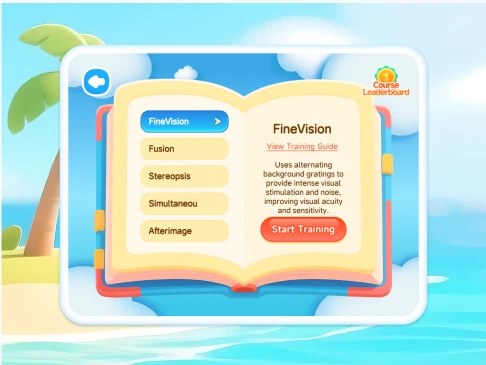
A real screen from the Simingtang training software
Explore the available trial tasks together. Watch whether your child understands the game, can complete it and feels comfortable. A trial assesses acceptance, not eventual treatment results.
Tablet for younger children; computer or tablet for confident users. A phone can be used when needed. The child should see clearly and operate comfortably.
Around once a day is a general reference. Your child’s plan may be shorter, split into sessions or adjusted. Never force a child to finish.
Bring previous results and training records. Seek an earlier review for declining vision, persistent discomfort or lack of progress. Follow your doctor’s schedule.

Send us the latest eye examination report. We will help you understand the key information for free.
This service helps parents understand information in existing eye examination reports. It does not provide diagnosis or replace evaluation by a qualified ophthalmologist.